AI & Big Data Expo 25.4.-26.4 in London, Olympia.
AI Related Tweets from @fineduai Team.
Sunday, April 28, 2019

Thursday, October 18, 2018
FinEduAI - Tekoäly lukiossa
Tekoäly lukiolaisen oppimisessa -hankkeen ensimmäisen syksyn blogipostaukset ja twiitit
Tuesday, May 1, 2018
Wakelet and virtual reality content at #itk2018 event
Storify is gone but Wakelet is a good replacement for share and curate social media content.
Thursday, October 19, 2017
Virtual Reality in Education
Some experiences from Virtual reality development project FinEduVR in four Finnish High Schools funded by Finland National Agency for Education.
More information:
FinEduVr Instagram
@fineduvr
Coordinators:
@sormuju, @apuustin, @ilotimo
ArVR2020 Storify
More information:
FinEduVr Instagram
@fineduvr
Coordinators:
@sormuju, @apuustin, @ilotimo
ArVR2020 Storify
Wednesday, October 18, 2017
Friday, October 21, 2016
Classroom Audio Tools
For next high school 6 week period we need some audio tools for different projects. I have use example Spreaker for student radio shows and book discussions.We have BYOD program going on and almost every high school first grader at Jyväskylä city, Finland has their own device at school, mainly laptops. Also we have some iPads and Chromebooks from our school. Most of students like to use audio apps from their smart phones.
Thursday, October 20, 2016
Timeline tools for teachers
Next period i need timeline tools with my students. So here is a Storify collection for me and my students.
Thursday, December 10, 2015
Virtual Reality Presentation at Virtual learning days 8.12.
We had Virtual reality presentation 8.12. at National Virtual Learning Days arenged by National Board of Education Finland. Our topics were virtual reality, 360 video and photos, 360 cameras, Google cardboard, Samsung Gear Vr, Drones, Phantom 3, Webvr, Virtual environments. Even some material are in Finnish, lots of presentations are in video format. Check it out. Lots of things happening on the field of education and virtual reality here in Finland.
Sunday, August 2, 2015
Google Cardboard, Copter drone, Theta camera and 360 Youtube
Google Cardboard and new Youtube 360 video feature are working well together. I predict it will be big thing next year in education, at least Finnish education, because we start officially our Virtual reality glasses and learning project 2015 -2017. Google Cardboard is almost free, and school can buy good 360 camera amount of 300 €.
Just order Google Cardboard, unbox like i my last Google Cardboard post, use Cardboard and Android app, go to 360 video channel, click Cardboard icon and just look over your shoulder. If you dont have Cardboard, you can see the video with Chrome Browser. On the left side of to video is a guide panel to look around.

We started our project beforhand this summer with Ricoh Theta 360 camera. Kuopio classical school principal Jukka Sormunen with students printed in spring 3D copter with Minifactory 3D printer. Little practice and after five crash downs Principal himself taped Theta camera and flew and shoot 360 video. We will buy a few drones with video cameras during this project.
Use Chrome browser or Google Cardboard to look this video.
Just order Google Cardboard, unbox like i my last Google Cardboard post, use Cardboard and Android app, go to 360 video channel, click Cardboard icon and just look over your shoulder. If you dont have Cardboard, you can see the video with Chrome Browser. On the left side of to video is a guide panel to look around.

Use Chrome browser or Google Cardboard to look this video.
Friday, July 31, 2015
Google Cardboard v 2.0 unboxed
I ordered Google Cardboard v 2.0 from I AM CARDBOARD and package has arrived. So lets unbox.
A Box


Cardboad headset


Ready to use. Took about two minutes.


Add your phone inside
Check our Virtual reality glasses and learning project 2015 - 2017 Start officially at August 2015
Monday, July 27, 2015
Virtual Reality 360 Cameras
One main goal in new four high school Virtual reality headsets and learning project 2015 - 2017 is to produce 360 videos by students and teachers to Samsung Gear VR or Google Cardboard. We start with Ricoh Theta but there are many virtual reality cameras coming to the market. We also follow development of these products. Do you know any other good 360 cameras we could use in this project?
Friday, July 24, 2015
Top Virtual Reality Stories
Yes, im back on blogging again, thanks for inspiring virtual reality development. Last post was about our Virtual Reality Glasses and Learning - project 2015 - 2017 which starts in August. I just unboxed my very own Samsung Gear VR and testing it tomorrow. There are lots of good up to date articles and i will post them from now on weekly in my blog.

Top articles:
Top 10 Best Virtual Reality Headsets
Virtual Reality Ecosystem Map
Google Cardboard
Google Cardboard makes virtual reality a thing for the masses
How to get started with Google Cardboard
Google Cardboard Vs. Samsung Gear VR
Top 20 Google Cardboard apps you can download
HTC Vive
HTC Vive
HCC Vive vs. Cardboard Vs Gear VR
Youtube
Google Introduces 360-degree YouTube ads
Wednesday, July 15, 2015
Virtual Reality Glasses and Learning - project 2015 - 2017
Virtual reality has taken huge steps in past two years from 3D and augmented reality to virtual reality glasses. Developers like Oculus Rift, Samsung Gear VR, Sony Project Morpheus, HTC Vive, Microsoft Hololens , Google Cardboard bring virtual reality glasses available to consumers at 2015 - 2016.
 This project is funded by Finnish National Board of Education. During years 2015 - 2017 four high schools from Muurame, Jyväskylä and Kuopio cities develop and test new virtual reality glasses in learning.
Project main goals:
- Experiences of virtual reality as learning environment.
- Offer 360 video production skills and tools for high school teachers and students
- Share current and future potential of virtual reality developers like Oculus Rift, Sony, Samsung, Google, Valve and Microsoft to all levels of Finnish education system
- Test virtual reality possibilities in high school subjects (history, geography, biology, sports, arts . . .), team learning and entrepreneurship studies.
- Test virtual reality as new tool used marketing schools.
- Organize high school level national virtual reality game event together with students and teachers
- With together our company partners Samsung Finland and Edutukku test Samsung Gear Vr virtual reality learning environment.
- Google Cardboard testing in classroom

We want to build global learning network with schools and companies interested in virtual reality glasses. If interested in collaboration, please contact us in Twitter or this blog comment section.
Contacts:
Teacher and Coordinator @ilotimo
Coordinator and Principal of Muurame high school @apuustin
Company developer, Principal of Kuopio classical high school @sormuju
All tweet about education technology and virtual reality in English
Resources:
My virtual reality Twitter list
Virtual Reality VR Scoop.it
Monday, November 10, 2014
Mirroring Android, Win, iOS-devices in Byod classroom
Im working now in Byod project and our first job is to make some tests about mirroring Android, Win, iOS-devices in Byod classroom.
 This first video mirroring Windows and Android devices. Windows 8-tablet and Samsung Note 3 smart phone and Samsung 10.1. Note tablet. Devices need Miracast support. We use wireless Netgear to mirroring those devices.
Mirroring Android and Windows in Byod classroom.
This first video mirroring Windows and Android devices. Windows 8-tablet and Samsung Note 3 smart phone and Samsung 10.1. Note tablet. Devices need Miracast support. We use wireless Netgear to mirroring those devices. Mirroring Android and Windows in Byod classroom.
Wednesday, May 14, 2014
12.5-13.5. Visit in Denmark 1:1 schools
I had great opportunity to visit in three 1:1 schools in Denmark at 12.5-13.5. After three hours of sleep i let photos do the most talking.
 First school was VUC Haderslev students 18+. New huge building look like a modern museum. They talk about Learning Lighthouse


Our next visit Parkvejens skole in Odder. Municipality of Odder is famous of its iPad 1:1 solutions. Next slide photos tell you some basic ideas related 1:1.


Monday, April 28, 2014
Green Screen iPad Studio in Classroom
 In Voionmaa high school we have team course now running. It means that three teachers from each subjects have their course together. Normally 6 hours week is now 18 hours / week. Courses are Speech communication, biology Environmental ecology and in geography Environment hasards like Tsunami or Earthquake.
My job is to make students communicate different ways using topics of biology and geography.
One task is to make environmental news using Green screen iPad app by Do Ink.
I found this Green Screen video tutorial from Jonathan Wylie. After that everything was quite easy.
One result from last week Earth Day (in Finnish). You can see the different background.
More Green Screen
Cybraryman Green Screen Page
Friday, October 18, 2013
Thinglink for teachers
Using Thinglink is easy. First download image, then tag with different web content like Youtube, Facebook, Twitter and more and finally share your content. I use it mostly with iPad. Thinglink app.
From Thinglink Youtube channel
Some ideas to use Thinglink in education:
73+ ways to use Thinglink
thinglinktoolkit.wikispaces.com
10 innovative ways to use Thinglink in the classroom
Wednesday, October 16, 2013
Labdisc Science measurement tools for iPad
Im running iPad project called Mobiluck involved six Finnish high schools. We have tested iPads and other tablets in classroom teaching and documentation tools, in project based learning, in sports, flipped classroom, in use of augmented reality applications. And now we testing iPad as science tool.
 Project bought 12 Labdisc Measurement tools made by Globisens Ltd. Each school get two measurement devices for use if physics, chemistry, math, geography classes. From Globisens page some features of these science devices: Ambient Temperature, Barometer, Colorimeter, Dissolved Oxygen, External Temperature, GPS, IR Temperature, pH, Relative Humidity, Sound Level, Turbidity, UV. Accelerometer, Air Pressure, Ambient Temperature, Current, Distance (Motion), External Temperature, Light, Microphone, Universal Input, Voltage . . .
We had training session for natural science teachers last week. At first their download a Globilab iPad app for teachers iPads. After couple hours of theory they went outside to take measurements like air pressure, moisture, ambient temperature, distance . . Teachers where quite inspired of many possibilities Labdisc offers. I will share more results later on.
Our Labdisc tools for high school use.
Enviro
Gensci
Biochem
Physio
Ltd
One Labdisc tutorial from Labdisc Youtube channel. How to use Labdisc outside classroom.
Tuesday, October 8, 2013
Google Forms for Teachers
In past few weeks I have been using a lot of Google drive in collaborative writing with high school first graders. Results has been so good that we have continued our courses team work theme. In media project week we are doing quizzes with Google forms. Topic is use of media during school week. Students fill questions in the evening.
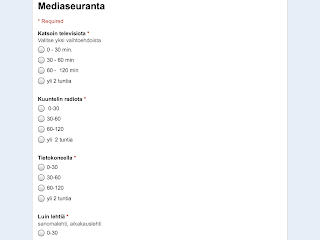 First multiple choice question is about time spending in different media and also there is open question about which and why they use certain social media tools. We have parents evening this week and students promised tell the truth:) in forms and let parents see they media time.
Second form is embed Youtube video Social media revolution and open question is to define social media as a concept.

Most of these guides are from Free technology for teachers made by Richard Byrne
How to create images based quizzes
80 ways to use Google forms in classroom
Tutorials: Google forms for teachers
8 Steps to create Google Forms
How to insert videos into Google forms
A short guide to creating and grading
 First multiple choice question is about time spending in different media and also there is open question about which and why they use certain social media tools. We have parents evening this week and students promised tell the truth:) in forms and let parents see they media time.
Second form is embed Youtube video Social media revolution and open question is to define social media as a concept.

Most of these guides are from Free technology for teachers made by Richard Byrne
How to create images based quizzes
80 ways to use Google forms in classroom
Tutorials: Google forms for teachers
8 Steps to create Google Forms
How to insert videos into Google forms
A short guide to creating and grading
Sunday, October 6, 2013
iPad app Coachmyvideo for sport teachers
I work in Voionmaa high school (Finland, Jyväskylä), which has special task for help athletes to do both practice and study well. We use iPad in sports, shoot videos from training from hockey to track and field. Students and teachers take videos, edit with iMovie. It also a good material to promote your school
Training videos
One favorite app is Coachmyvideo. Our hockey coach Mika Lievonen uses app in his training . You can make slow motions, frame by frame, forward and reverse, compare to videos or photos each other. One good feature is drawing tool, it also calculates angles.
Photo from two videos feature

Subscribe to:
Posts (Atom)